Plugins
Zephyr ships with a community plugin system. Plugins live in a separate repo, Zephyr-plugin, and Zephyr fetches the registry from there on demand.
Plugin types
| Type | What it is | Files it ships |
|---|---|---|
| Theme | A CSS file applied to Zephyr's UI. | theme.css |
| Feature | A full mini-app running in a sandboxed iframe with its own sidebar item. | dist/index.html (built from Svelte) |
| Game | A new game definition Zephyr can target. | game.json |
| Mod | A downloadable mod for a registered game (see Publishing your mod). | manifest only |
Themes restyle Zephyr. Features are real apps: you write Svelte 5, build to a single HTML file, and Zephyr loads it in a sandboxed iframe with a postMessage bridge for host capabilities.
Installing a plugin from the registry
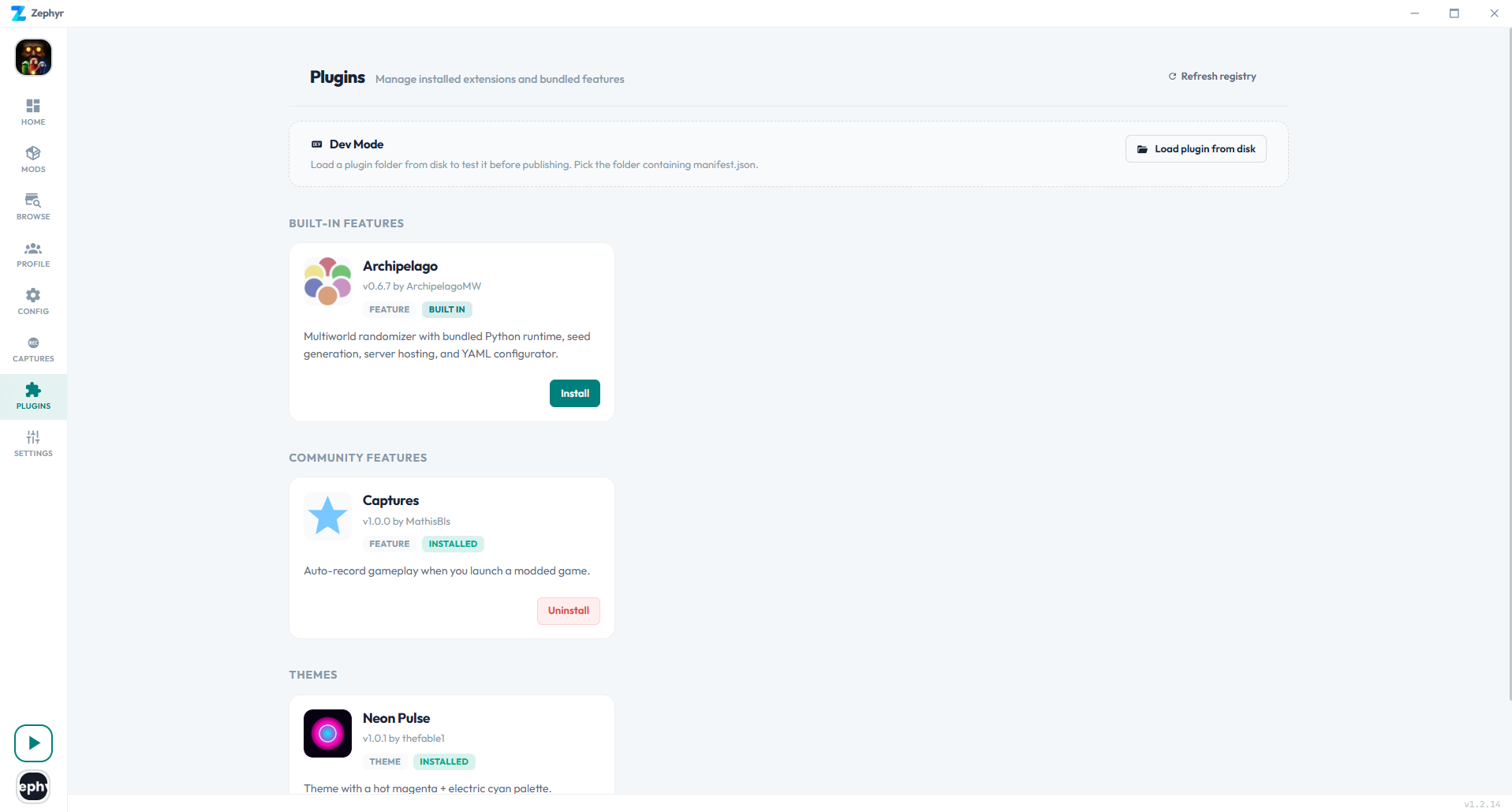
- Open the Plugins page in Zephyr.
- Browse the community sections. Click Install on the card.
- Features get a new sidebar item; themes can be picked in Settings → Appearance.
- Uninstall any time from the same page.
Click Refresh registry if a freshly published plugin doesn't appear. The CDN refreshes within a few minutes.
Writing a plugin
Everything happens inside the Zephyr-plugin repo.
git clone https://github.com/Prismo-Studio/Zephyr-plugin.git
cd Zephyr-plugin
pnpm install
pnpm new-plugin    # interactive wizard
The wizard asks for:
- Type:
Theme(CSS only) orFeature(full Svelte app) - Display name, slug (folder name), author (GitHub username), description
- Sidebar label (features only, max 18 chars)
It scaffolds themes/<slug>/ or features/<slug>/ with a working starter you can edit immediately.
Live preview in Zephyr (Dev Mode)
You don't need to publish a PR to test. In Zephyr:

- Plugins → Dev Mode → Load plugin
- Pick your
features/<slug>/(orthemes/<slug>/) folder - For features:
pnpm devinside the folder. Vite watches, Zephyr's filesystem watcher reloads the iframe on every save - For themes: edit
theme.css. Zephyr re-injects it automatically
A purple DEV badge appears on the card so you know it's loaded from disk rather than the registry.
The Plugin SDK
Every feature plugin imports @zephyr-plugin/sdk (set up automatically by the wizard).
Components matching Zephyr's look
<script lang="ts">
  import { Toggle, Select, Button, Card, Row, StatusPill, StatCard } from '@zephyr-plugin/sdk';
</script>

<Row title="Enable">
  {#snippet control()}<Toggle bind:checked={enabled} />{/snippet}
</Row>
Available components: Toggle, Select, Button, Card, Row, StatusPill, StatCard.
Import @zephyr-plugin/sdk/tokens.css to inherit Zephyr's color tokens. Your plugin will track the user's active theme automatically.
Host bridge: zephyr.*
import { zephyr } from '@zephyr-plugin/sdk';

// Per-plugin key/value storage
await zephyr.storage.set({ enabled: true });
const state = await zephyr.storage.get<{ enabled: boolean }>();

// Per-plugin file storage
const filename = await zephyr.fs.writeBlob('clip.mp4', blob);
const files = await zephyr.fs.list('.mp4');
const url = await zephyr.fs.getUrl('clip.mp4');   // file:// URL safe in <video>
await zephyr.fs.delete('clip.mp4');
await zephyr.fs.openFolder();                     // reveal in OS file manager

// Toasts and external links
await zephyr.notify('Done', { kind: 'info' });
await zephyr.openExternal('https://...');

// Plugin metadata (id, name, version, dev flag)
const info = await zephyr.plugin();
Everything is per-plugin. A plugin cannot read another plugin's storage, write outside its own folder, spawn processes, or access Zephyr's mod data.
What a feature plugin can do natively
The iframe is a normal web context with these permissions enabled:
fetch()andWebSocketto any server (no CORS bypass, same rules as a browser)getDisplayMediafor screen recording,getUserMediafor mic/cameraIndexedDB,localStorage,canvas,Web Audio,WebGL- Single-file HTML bundles up to ~10 MB
Not available without an SDK extension: reading installed mods, hooking into game-launch events, running native code, patching binaries.
Manifest reference
| Field | Required | Applies to | Notes |
|---|---|---|---|
id | yes | all | lowercase slug (a-z, 0-9, -). Must match the folder name. |
name | yes | all | display name in the plugin browser. |
version | yes | all | semver, e.g. 1.0.0. |
type | yes | all | one of theme, feature, game, mod. |
author.name | yes | all | shown on the plugin card. |
author.url | no | all | profile or project link. |
description | yes | all | one or two sentences. |
icon | no | all | filename in your folder, an absolute URL, or an Iconify id (mdi:palette). Shown on the plugin card. |
entry | yes | themes | filename of the CSS asset (theme.css). |
entry | no | features | path to the built HTML, defaults to dist/index.html. |
sidebarLabel | no | features | short label for the sidebar item (max 18 chars). Falls back to name. |
sidebarIcon | no | features | Iconify id (mdi:record-rec, mdi:video, …). Defaults to mdi:puzzle-outline. |
defaultInstalled | no | features | bool, default false. |
removable | no | features | bool, default true. |
package.url | yes | mods | URL of the mod archive. |
package.sha256 | yes | mods | SHA-256 of the archive. |
game | yes | mods | slug of the target game. |
Example feature manifest
{
  "id": "captures",
  "name": "Captures",
  "version": "1.0.0",
  "type": "feature",
  "author": { "name": "MathisBls" },
  "description": "Auto-record gameplay when you launch a modded game.",
  "icon": "icon.svg",
  "sidebarLabel": "Captures",
  "sidebarIcon": "mdi:record-rec",
  "entry": "dist/index.html"
}
Publishing a plugin
- Open a PR against Zephyr-plugin adding your folder under
features/,themes/,games/, ormods/. - For features: commit your built
dist/index.htmlalong with the source. The registry build does not run plugin builds. - CI regenerates
registry.jsonafter merge. - Within ~5 minutes (CDN refresh) the plugin appears in every Zephyr install's plugin browser.
See the Zephyr-plugin README for the full contribution flow and validation commands.