Install Zephyr
Zephyr ships as a regular desktop installer. Pick the file for your OS, run it, you're done. There's no account creation, no setup wizard.
Download
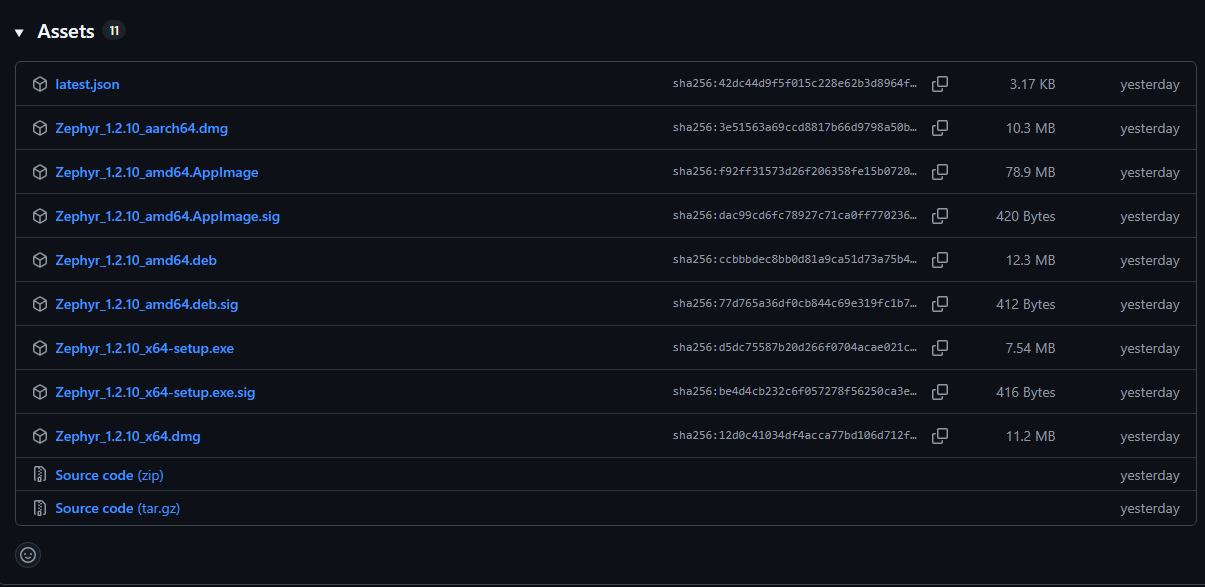
Grab the latest release from the releases page. The version selector on the home page also points at the right asset for your platform.
| Platform | File | Notes |
|---|---|---|
| Windows | Zephyr_x.y.z_x64-setup.exe | NSIS installer. Per-user install, no admin required. |
| macOS (Apple Silicon) | Zephyr_x.y.z_aarch64.dmg | M1/M2/M3 Macs. |
| macOS (Intel) | Zephyr_x.y.z_x64.dmg | Older Intel Macs. |
| Linux | Zephyr_x.y.z_amd64.AppImage | Self-contained, no install needed. chmod +x and double-click. |
| Linux | zephyr_x.y.z_amd64.deb | Debian / Ubuntu / Pop!_OS / Mint. |
| Linux | zephyr_x.y.z_x86_64.rpm | Fedora / openSUSE. |
First launch
Windows: SmartScreen
The first time you run Zephyr you'll get a SmartScreen warning saying "Windows protected your PC". This happens because the binary isn't code-signed (yet). Click More info -> Run anyway. You only need to do this once.
macOS: Gatekeeper
On a fresh install macOS will refuse to open Zephyr because it's not notarized. Open System Settings -> Privacy & Security, scroll to the message about Zephyr being blocked, and click Open anyway. Or run xattr -dr com.apple.quarantine /Applications/Zephyr.app from a terminal.
Linux: AppImage
Make it executable and run it:
chmod +x Zephyr_*.AppImage
./Zephyr_*.AppImage
On some distros you'll also need libfuse2 (Ubuntu 22.04+). Install it with sudo apt install libfuse2t64 (or libfuse2 on older releases).
Updating
Zephyr checks GitHub for new releases on launch and shows an in-app dialog when one is available. Confirm and the new version downloads in the background; the app then restarts to apply the update. Your profiles, configs, and installed mods stay where they are.
TIP
Updates are not auto-applied. You always click to confirm.
Uninstalling
- Windows: Add/Remove Programs -> Zephyr -> Uninstall.
- macOS: Drag
Zephyr.appfrom Applications to the Trash. - Linux: Delete the AppImage, or
sudo apt remove zephyrfor the .deb /sudo dnf remove zephyrfor the .rpm.
User data (profiles, mods, settings) is left behind on purpose - see Where Zephyr stores files if you want to clean it up too.