Installing the runtime
Before you can generate or host anything, the randomizer needs an Archipelago install on disk. Zephyr fetches it for you - you don't have to clone the Archipelago repo by hand.
Python
Zephyr prefers a compatible system Python (3.11-3.13) to bootstrap the venv. If none is found it downloads a pinned python-build-standalone interpreter into the runtime folder and uses that instead, so the runtime installs even on systems with no Python.
A system install is still recommended if you have one - it's faster than downloading the bundled copy on first run. Check with python --version (or python3 --version on macOS/Linux).
The Python runtime block at the top of the Multiplayer view shows what was detected and whether the venv is ready to generate.
What gets installed
When you trigger the install, Zephyr does two things:
- Downloads and extracts the Archipelago source tree into your data dir (
randomizer/archipelago-runtime/or similar location). - Provisions a Python venv inside that tree and installs the Python dependencies Archipelago needs.
The first step is required to generate at all. The second step is required for any APWorld that has additional Python dependencies (e.g. Zillion needs zilliandomizer).
Triggering the install
The first time you open the Archipelago page, you'll see a banner if the runtime isn't installed:
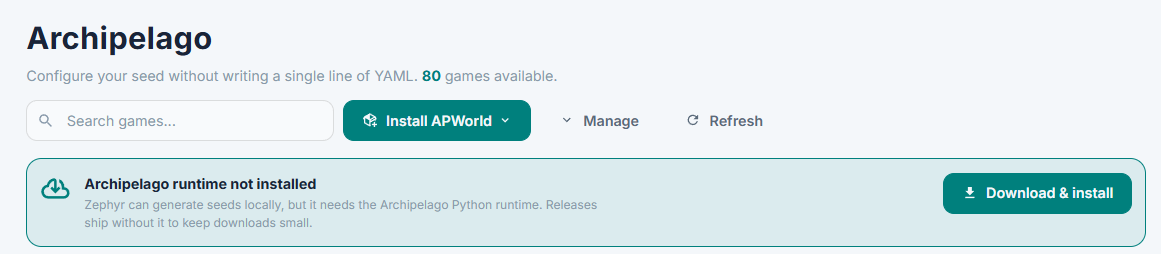
Click Download & install. Progress shows in the same banner. Once the runtime is on disk you can trigger the venv setup separately if needed (the banner switches to a "Python dependencies not installed" prompt with an Install Python dependencies button).
Reinstalling
If something is broken, the simplest fix is to delete the runtime folder under your data dir and re-run the install. There's no in-app "Reinstall runtime" button at this time - removing the folder and clicking install again does the equivalent.
Disk usage
After both steps, the runtime takes a few hundred MB. To remove it:
- Delete
randomizer/archipelago-runtime/(or whatever the runtime root is) under the data dir.
The randomizer page will go back to showing the install banner next time you open it.
Troubleshooting
If install fails or generation later complains about a missing module, see Randomizer troubleshooting.