Custom .apworld files
Archipelago is extensible - anyone can write an APWorld for a new game and ship it as a .apworld file. Zephyr ships default schemas for the standard set of worlds, and you can install additional ones at any time.
Where they live
Custom .apworld files live in the Archipelago runtime's custom_worlds/ folder, inside Zephyr's data dir (see Data locations).
Anything in this folder is auto-discovered by Archipelago when the generator runs.
Installing - via the UI
The Archipelago page has a Custom APWorlds panel with a drop zone. Drag one or more .apworld files into it (or anywhere on the Zephyr window) and they're copied into custom_worlds/.
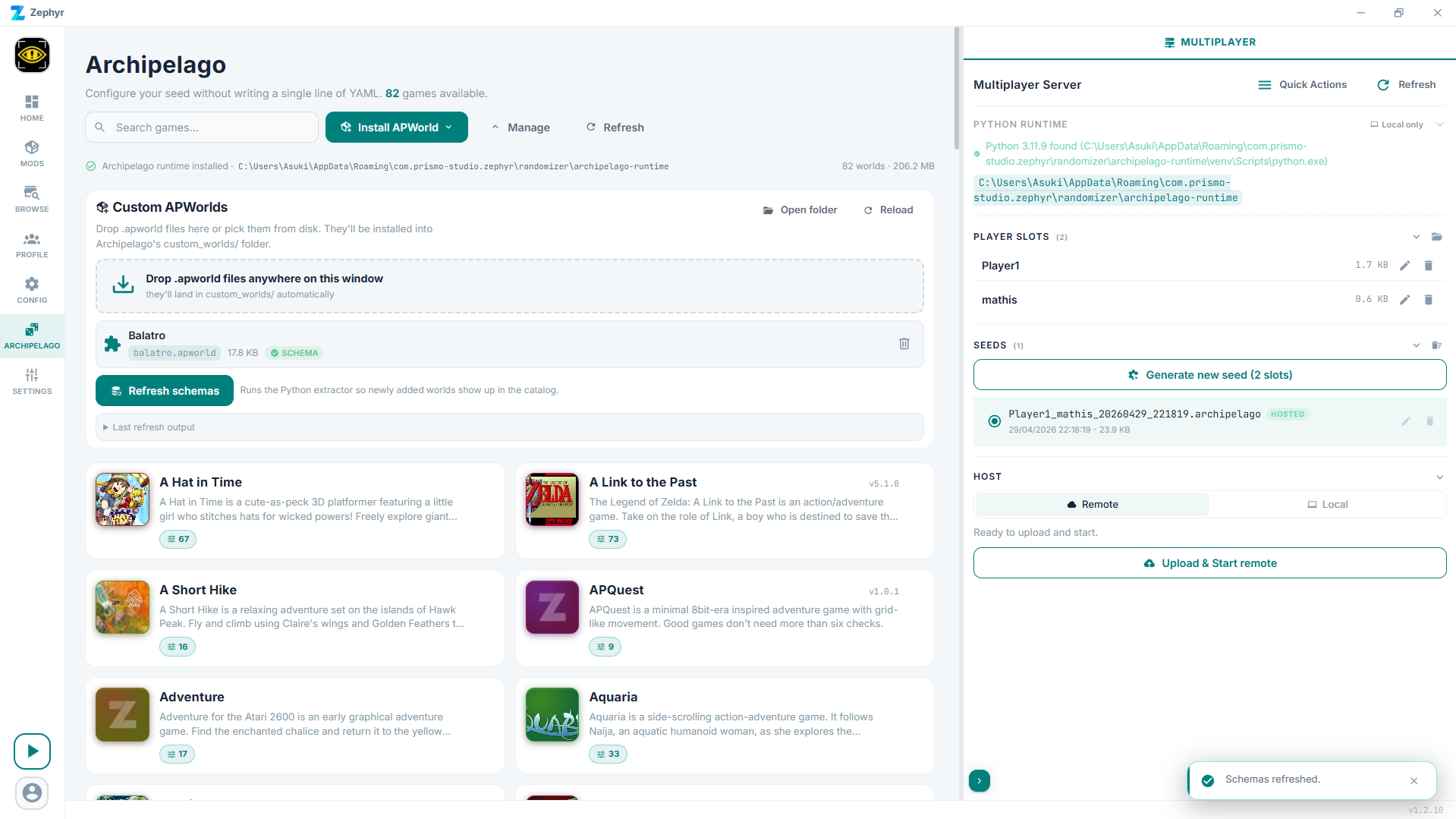
The panel header has shortcuts to open the custom_worlds/ folder in your file manager and to reload the on-disk list.
Refreshing schemas
After installing new worlds, Zephyr needs to extract their option schemas so the configurator can show form fields. The Custom APWorlds panel has a Refresh schemas button at the bottom; the same action is also available in the Quick Actions menu in the Multiplayer view header. Schema refresh runs the Python extractor against every installed world and updates the catalog.
Each installed APWorld in the panel shows a chip that flags whether its schema has been extracted yet. The configurator won't have proper labels for a world until its schema is built.
Removing
Each row in the Custom APWorlds panel has a trash icon. Confirm and Zephyr deletes the .apworld from custom_worlds/.
Updating
There's no "update" button. Updating means: remove the old version, drop the new one in, refresh schemas.
Where to find APWorlds
- Archipelago's official world list - every world that's been merged upstream.
- Game-specific Discords - many WIP worlds live there before going upstream.
- Authors usually publish on GitHub. Search for
<game name> apworld.
Verification
Zephyr does basic structural checks when you install. It does not sandbox the Python code - APWorlds are arbitrary Python that runs in the generator process.
If a world is from someone you don't trust, read the source first. The .apworld is just a renamed zip; you can extract it with any zip tool and look at the Python.
Building your own
Zephyr's runtime is a stock Archipelago install. APWorlds that work in the upstream Archipelago/Generate.py will work here. The schema extractor reads your option groups and option classes via reflection - as long as your option classes are standard Options.Toggle, Options.Choice, etc., the form generator handles them automatically.
Documentation for APWorld development: Archipelago's tutorial.
Troubleshooting
- Not a valid apworld on install - the file is missing the right structure. Confirm it works in stock Archipelago first.
- World installs but doesn't appear in the catalog - run Refresh Schemas from the Quick Actions menu. If it's still missing, check the schema-refresh output for the world's import error.
- Game appears but options are empty - the world doesn't expose its options in a form the schema extractor can read. The schema falls back to "no options" rather than crashing.